AI kitchen control
Eyes in your kitchen, every shift
KitcheQ turns the cameras you already have into a food-safety auditor that never leaves the kitchen. It looks at your kitchen every five minutes, day and night, and every morning you get a report of the hygiene slips it spotted, so your team can fix them and build better habits.
Start your free trial See the report- Uses your existing cameras
- No new hardware
- Cancel at any time
How it works
Set up in minutes, a report every morning
No new cameras, no wiring, no one watching screens.
1 · Install
Use your own cameras
Install the KitcheQ App on a Windows PC at the restaurant and choose your kitchen cameras. No new hardware, set up in minutes.
2 · Look
Always looking
KitcheQ looks at your kitchen every five minutes, 24 hours a day, and checks the practices your food-safety rules ask for.
3 · Improve
A report every morning
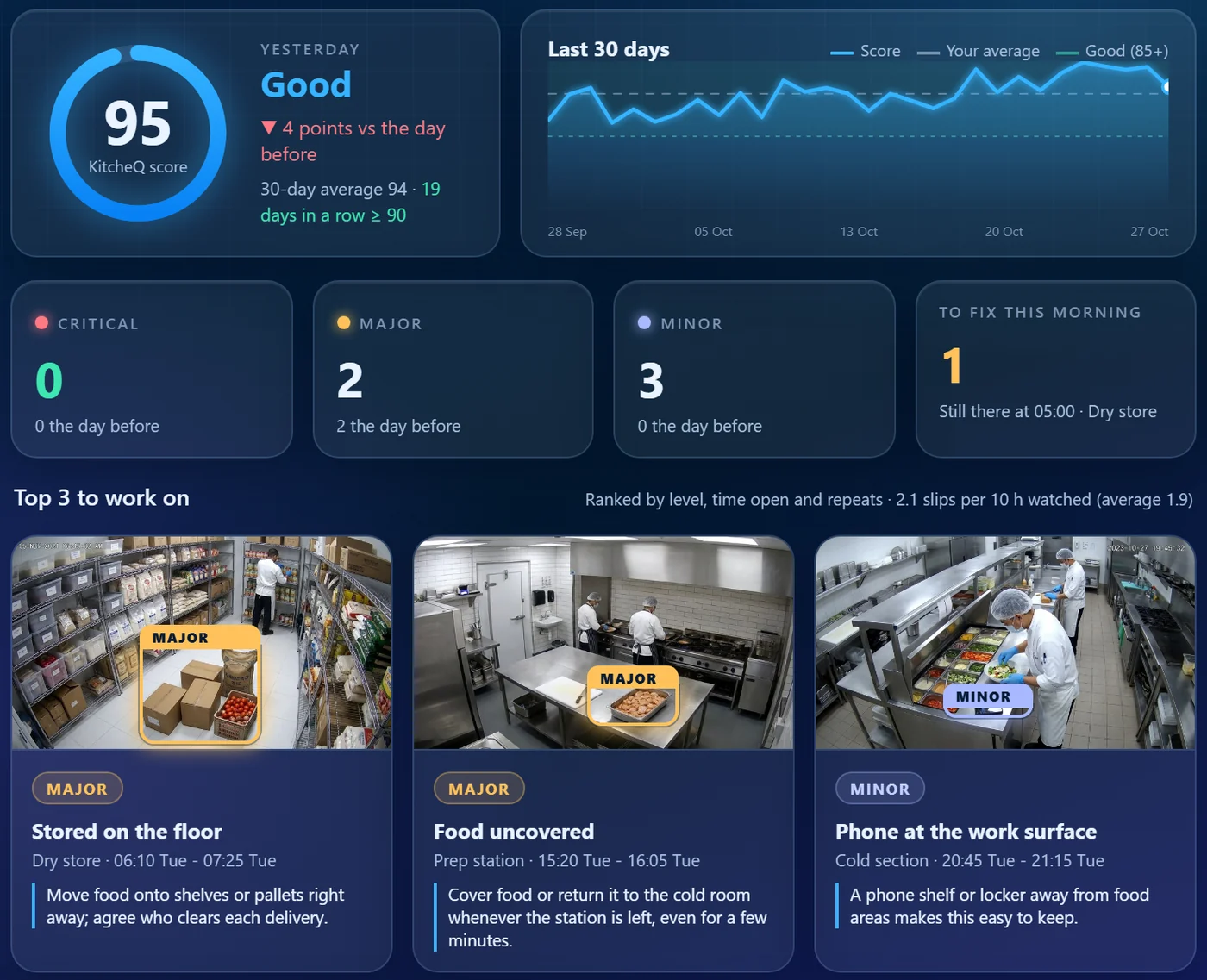
A daily email shows what was spotted, with the picture of each moment, and the trend over 30 days. Your team fixes, coaches and keeps the standard.
Your morning report
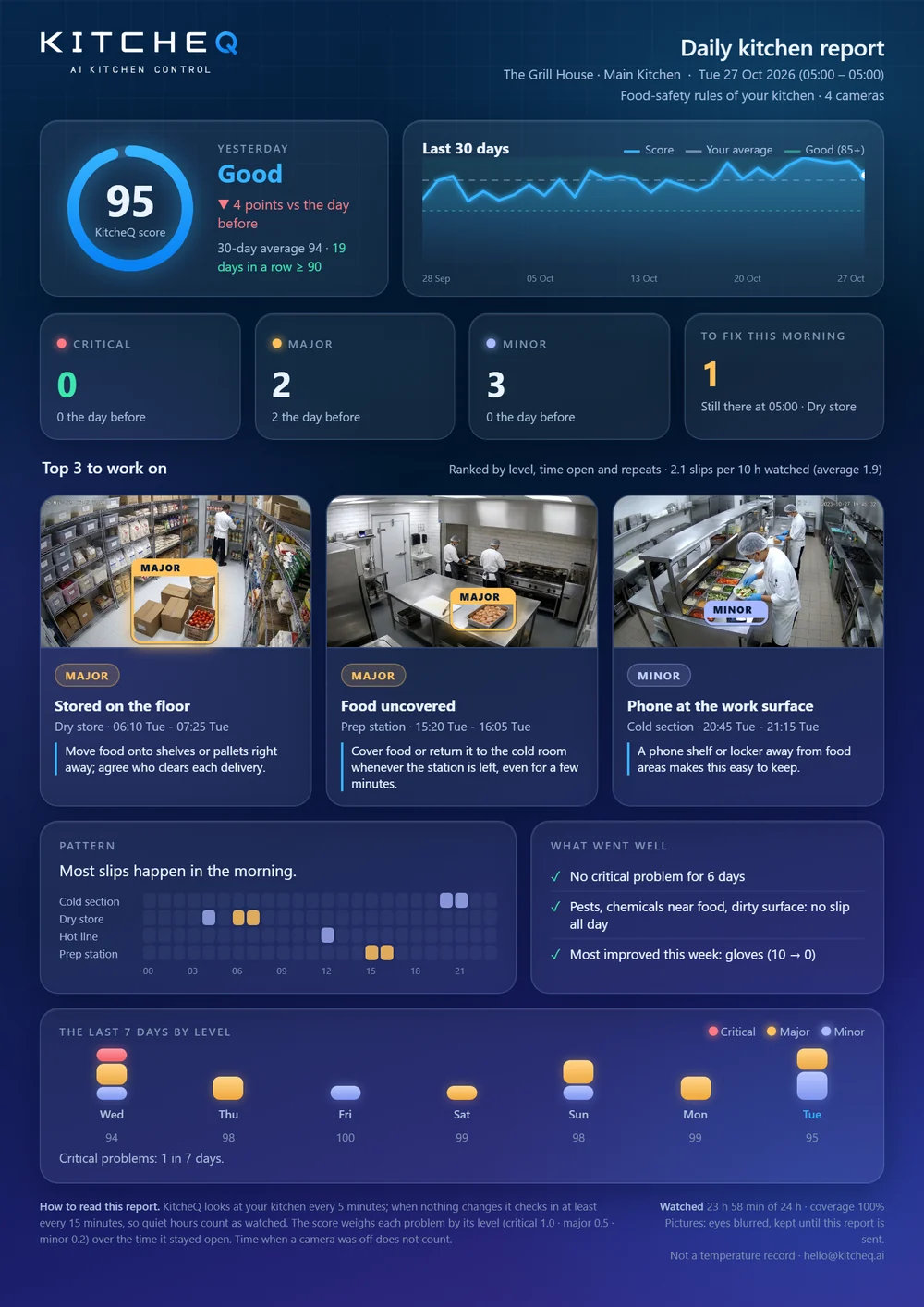
Everything that matters, on one page
Every morning, before service, one clear report by email.
- A score for the day, compared with the day before and your 30-day average
- The top 3 slips to work on, each with its picture and what to do about it
- What is still there in the morning, to fix before service
- When and where slips happen, and what went well
See it in action
KitcheQ in under a minute
From your cameras to the morning report.
What KitcheQ looks for
The everyday slips that matter for food safety
Checked against the food-safety rules of your kitchen, every five minutes, day and night.
Head cover and clothing
Hair covered, and protective clothing for everyone handling food.
Gloves and face masks
Gloves when handling food and masks over nose and mouth, where your rules ask for them.
Open food
Food left uncovered and unattended in the prep area.
Floor storage
Food, boxes and containers stored on the floor.
Spills, surfaces and bins
Spills, dirty work surfaces, and open or overflowing bins.
Pests and other slips
Pests, wooden boards, phones at work surfaces, and people eating or sitting on them.
Who it is for
Made for the people who run kitchens
KitcheQ helps the team hold the standard. It supports your cooks; it does not punish them.
Owners
Your second pair of eyes when you cannot be there. Know how every shift went, every morning.
Kitchen managers
Your tool to hold the standard on every shift. You confirm or correct what KitcheQ saw, and it learns your kitchen.
Quality teams
A continuous audit between your visits, with a daily report from every site, so your visits go where they are needed.
Privacy built in
KitcheQ is about practices, not people. There is no face recognition and no names, eyes are blurred in the pictures you review, and pictures are deleted after the daily report. Read our privacy policy.
Questions
Frequently asked questions
Do I need new cameras or hardware?
No. KitcheQ uses the kitchen cameras you already have. You install the KitcheQ App on a Windows PC at the restaurant that is on the same network as your cameras or recorder.
Which cameras work with KitcheQ?
Most IP cameras and recorders: those that support ONVIF, and Hikvision and Dahua cameras and recorders. The KitcheQ App finds them on your network, or you add them by address.
When do I get the report?
Every morning, by email, for the day before. It covers the whole day and night, and shows what to fix before service.
Does KitcheQ send live alerts or record temperatures?
No. KitcheQ is a daily report on hygiene practices. It does not raise live alarms and it is not a temperature record.
What happens to the pictures?
Pictures are used to make your daily report and are deleted once it is sent. Pictures your team reviews to teach KitcheQ are kept with eyes blurred to improve the detection for your kitchen. There is no face recognition.
How much does it cost, and can I cancel?
One price per site per month, shown in your currency on the pricing page. You start with a free trial, and you can cancel at any time from your account.
See how your kitchen did, tomorrow morning
Free trial. No charge until the trial ends, cancel at any time.
Start your free trial Talk to us